How MarginMagic actually runs on AWS: architecture, costs, and what AI leverage did and didn't give us
What MarginMagic is
MarginMagic compares a retailer's supplier costs against live competitor prices for the same SKUs and tells them which products they're losing money on. The first customer is an independent pool store in Ontario with about 800 active SKUs across roughly a dozen suppliers.
The product has to do three uninteresting things reliably: pull costs from a supplier portal, scrape competitor websites for prices, and render margin math in a dashboard that doesn't lie. Everything else is decoration.
The architecture
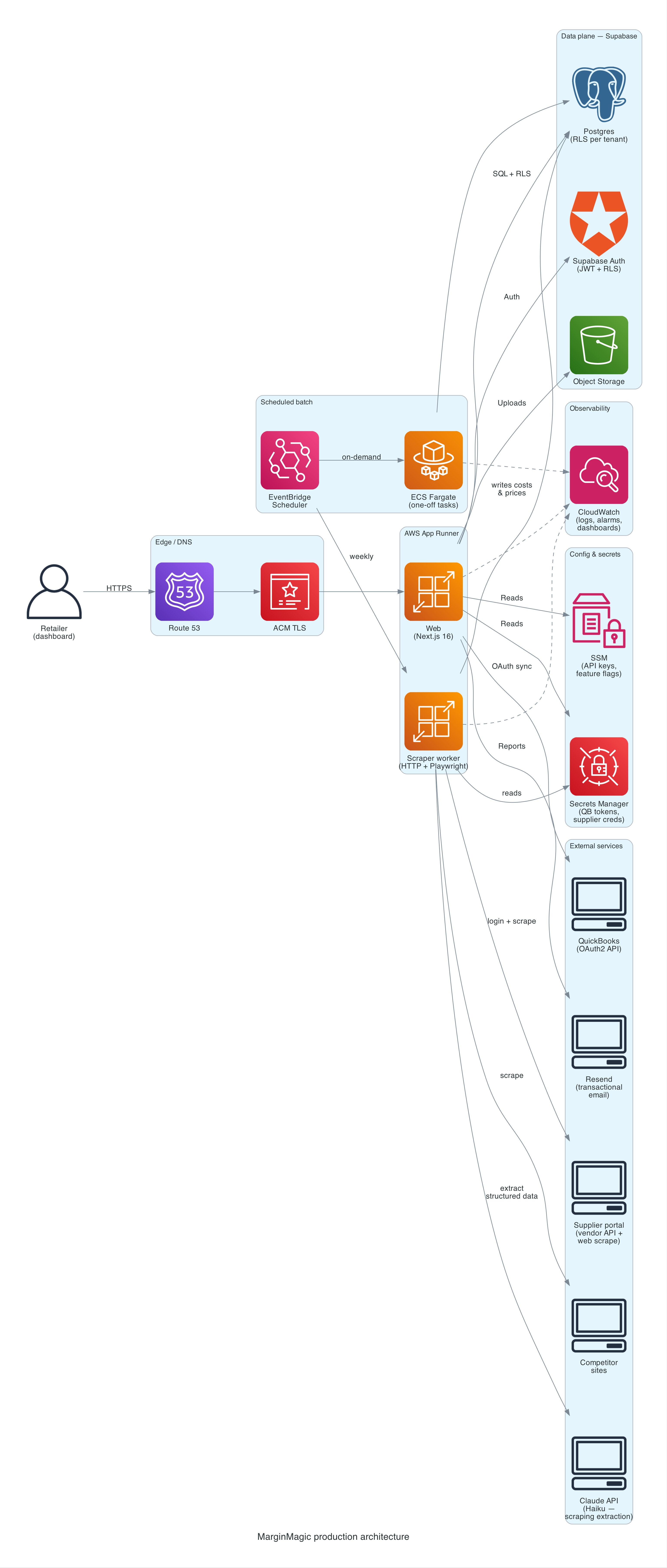
There are two deployable services, both Node/TypeScript, both on AWS App Runner:
- Web: Next.js 16, serves the dashboard, API routes, and auth flows. Auto-pauses when idle.
- Scraper worker: a headless HTTP server that runs Playwright against supplier portals and competitor sites. Kicked off by EventBridge on a weekly cadence, not a cron inside the app.
Behind them:
- Supabase for Postgres, auth (JWT + Row-Level Security), and object storage. RLS on every table.
- EventBridge Scheduler triggers the scraper runs, the weekly report job, and the daily QuickBooks sync.
- ECS Fargate as the execution target for the scraper when EventBridge needs to run a one-off task definition; App Runner runs the long-lived HTTP surface.
- Secrets Manager + SSM Parameter Store for credentials and configuration. Supplier usernames/passwords, API subscription keys, and QuickBooks tokens all live there. The app assumes nothing about environment variables beyond what a task needs to boot.
- CloudWatch for logs and a small set of alarms (web 5xx rate, scraper failures, latency). A single dashboard.
- ECR for container images with lifecycle policies pruning old builds.
- Resend for transactional email (weekly PDF reports, alerts).
- Claude (Haiku + Sonnet) called from the scraper when we need to pull structured fields out of a competitor's rendered page. Haiku handles the bulk of pages where extraction is straightforward; Sonnet gets called on harder cases (ambiguous layouts, fallback when Haiku's confidence is low). Tiered model use keeps cost down without losing the cases that need more reasoning.
No VPC, no NAT gateway, no load balancer, no Lambda-fronted API, no custom CDN. Those are the things that cost money and don't earn it at this scale.
Why App Runner instead of ECS or Lambda
App Runner is not a cool answer. It is a correct one for one web service and one scraper service.
- Lambda would require breaking the Next.js app up and would cap Playwright runs at 15 minutes. The scraper sometimes needs longer when a supplier portal is slow.
- ECS Fargate behind ALB is what we'd have built five years ago. For two containers, the ALB alone costs more than the compute.
- App Runner auto-pauses idle services, which on this traffic shape saves real money every month. It also manages TLS and the container deploy story so we don't write Terraform for load balancers we don't need.
When the scraper needs ECS behavior (one-off Fargate task with a different image), EventBridge points straight at an ECS task definition. App Runner runs the HTTP surface; ECS runs the batch side. Two execution models, one cluster, no glue.
What's not in the diagram
- A VPC. We don't own one. Supabase is managed and internet-facing; App Runner outbound is fine on the public internet. If a customer ever needed private networking we'd add a VPC connector; until then the square on the diagram would be unused infrastructure that still has a bill.
- A message queue. We have exactly one cross-service event today (EventBridge → scraper), and it's time-based, not volume-based. SQS with one consumer is cargo-culting.
- A dedicated analytics pipeline. Reporting runs off Postgres with a small set of materialized views. When that stops scaling we'll add something. Not before.
- Caching layers. No Redis. No CloudFront in front of the app (yet: that's on the roadmap for IP geo and WAF, not for latency).
The monthly bill
Numbers below are what actually gets charged, not what AWS's pricing page suggests in isolation. Rounded to match reality.
Production, one tenant, typical month (CAD):
| Line item | Monthly |
|---|---|
| AWS App Runner (web, auto-pause) | $8–15 |
| AWS App Runner + Fargate (scraper, 1–2 hrs/day) | $5–10 |
| Supabase (Free tier, headed toward Pro) | $0 today, $25 soon |
| Claude API (Haiku + Sonnet, scraping extraction, ~200–500 pages/day) | $5–15 |
| AWS Secrets Manager (~15 secrets × $0.40) | $6 |
| AWS SSM Standard parameters | $0 |
| CloudWatch logs + metrics | $1–3 |
| Resend (free tier, 1–3 reports/day) | $0 |
| Route 53 / TLS via ACM | $0.50 |
| Total | ~$20–40 CAD |
The biggest single variable is Claude API usage during scraping. Page volume is the lever. Haiku at its per-token pricing is cheap enough to use as the default extractor; Sonnet gets held in reserve for pages Haiku can't handle confidently. That tiered approach ("cheap model first, expensive model when needed") keeps the bill low without giving up accuracy on the hard pages. The alternative, brittle CSS selectors across dozens of competitor sites, costs more in engineer hours than the Claude bill ever will.
At 10 tenants, most of the numbers are unchanged because the scraper workload dominates and doesn't scale linearly with tenant count for overlapping SKUs. We'd expect $100–180/month all-in. Supabase moves to Pro, Claude API roughly 5–10×.
At 50 tenants, the scraper starts needing real parallelism, Claude API goes to $100–400/month depending on competitor-site overlap, Supabase moves up a tier. Call it $400–600/month. Per-tenant cost keeps falling; that's the whole SaaS thesis.
What AI leverage actually gave us
This is the honest version. The parts where I'd do it again tomorrow.
Terraform, GitLab CI, and the deploy story
AWS App Runner with custom domain, ECR lifecycle policies, EventBridge schedulers, ECS task definitions, the IAM policies to make all of them talk to each other. Generating that from scratch is a week of clicking through docs. With AI it was about a day, reviewed and corrected. The wins aren't the first draft; they're the speed of iteration when a reviewer flags something and you need to make the change across five files consistently.
The GitLab CI pipeline has SAST, dependency scanning, secret detection, container scanning, and a Claude-based code reviewer that posts comments on every MR. I didn't write that pipeline from a template. It was assembled one job at a time with an assistant that knew what jobs usually show up together.
Database migrations and the boring CRUD
We ship migrations constantly. Adding a column, adding a table, wiring a new Row-Level Security policy, updating a Postgres function. The cycle is one prompt and one review per change. The AI doesn't save typing. It saves the context-switch of remembering exactly how Supabase wants RLS written, or which Postgres version supports which syntax.
Scraper heuristics that would have taken a human a week
Competitor websites are JavaScript-rendered single-page apps. We tried CSS-selector scraping, then XPath scraping, then regexes, then a vision model reading full-page screenshots. The vision experiment only happened because the incremental cost of "try a different approach" drops to hours instead of weeks. Most of those experiments failed. Some didn't. The ones that worked are now in production.
Writing the explanations we should have written
Runbooks, ADRs, onboarding docs, every docs/ file in the repo. The kind of writing a solo developer reliably under-invests in, because you can feel the work not paying off yet. AI-assisted, they get written alongside the code, at the moment the decision is made, before the rationale is lost.
What it didn't give us
This is the part most people don't publish. We'll publish it because it's the only section that matters.
It confidently built on a wrong assumption
We migrated our supplier-cost sync from Playwright scraping to an official vendor API. The vendor confirmed in writing that the API returns USD. We built a full FX-conversion layer on top: schema changes, Bank of Canada Valet client, sanity bounds, fallback logic, a migration, an ADR with a 13-persona design review, a merged PR.
Weeks later, the same vendor contact wrote back: "My apologies, I was mistaken. The API returns your account's default currency. For your customer, that's CAD."
The AI wasn't wrong about the code. The code was well-structured, well-tested, and solved the problem we told it to solve. But the premise was wrong, and neither the AI nor the persona-driven review caught it, because the premise was a statement from an external human. The thing that would have caught it was a live API call with known dollar amounts compared against what the customer actually pays. That's how we caught it in the end.
Lesson: AI cannot verify external ground truth. Any design that depends on a vendor statement or a document should have an end-to-end sanity test against reality before a single migration runs. "Trust but verify" is not an AI failure mode; it's a human engineering discipline that AI cannot substitute for.
It produced a plausible sync that was running against the wrong environment
The production schedule for the supplier sync was pointing at SUPPLIER_API_ENV=sandbox. It had been that way since the initial supplier integration migration landed. The sandbox returns data that looks real. It even uses the customer's home branch number. But it's a test fixture and the prices drift. For some SKUs it happened to match production. For others it was off by 2.3×. The database was slowly accumulating wrong costs tagged with the wrong currency.
No one noticed, because the dashboard kept rendering. The values were all numbers, in the right order of magnitude, updated on the right cadence. "Works on my machine" had become "works everywhere, just wrong."
Lesson: AI-generated infrastructure is excellent at looking correct. It is not excellent at flagging when a plausible configuration would be wrong in production. Environment tags, feature flags, and kill switches have to be human-checked in the same way you'd check them in a code review written by another human, because that is effectively what happened.
It encouraged over-engineering when the right answer was "stop and ask"
The ADR that drove the USD/CAD work is a good ADR. It considers three options, picks one with clear trade-offs, names its reversal criteria, and specifies a rollout plan. It is also a solution to a problem we didn't have.
When a junior engineer spends a week building something that isn't needed, the cost is a week. When an AI-assisted developer builds that same thing, the cost is a day. But the temptation to build it is higher, because the cost felt low. The loop "ask, build, review" is so fast that the question "should we be building this at all" gets less airtime than it deserves.
Lesson: AI cheapens construction, which makes the cost of skipping the why conversation feel smaller than it actually is. The discipline you need more of, not less, is the pre-implementation conversation that decides whether to write code at all.
Partial-apply migrations at deploy time
A schema migration for a feature landed on main, but only part of it was auto-applied in production (we run migrations manually per a deliberate process). The web deploy rolled out expecting new columns that weren't there. A customer-facing page 500'd for a few hours before we caught it.
The AI wrote the migration correctly. The AI wrote the code that reads the new columns correctly. The AI did not know, because nothing in the prompt told it, that our deploy process expects the migration to be run out-of-band and that the code assumes the columns exist on first request. That coupling was institutional knowledge, not code.
Lesson: AI operates on what's in the codebase. Anything out-of-band (a manual deploy step, a human-executed cron, a shared config outside Terraform) is a landmine AI cannot see. Either encode the process or accept that you will hit one of these every few months.
The operating model behind all of this
One developer. One customer. AI pair-programming for the bulk of construction, with strict rules about when the AI is in the driver's seat and when it isn't.
A few things we do that matter:
- Every change traces to a GitLab issue. No branches without an issue. No MRs without a
Closes #N. This isn't bureaucracy; it's what gives an AI-assisted workflow a paper trail a human can audit a month later when they can't remember why a decision was made. - Every MR gets reviewed by a Claude-based CI reviewer that comments on the diff. It's not a gatekeeper. It's a second opinion. It flags small things a human reviewer misses when they're tired.
- Architecture decisions go in
docs/adr/before code. The persona round-table (architect, SRE, AppSec, privacy officer, cost engineer, project manager) is a prompting pattern that catches about half the things a real design review would. The other half requires an actual human who knows the business. We hit both misses above because we stopped at the first half. - Nothing manual in production. All infrastructure is Terraform-applied through CI. All secrets are in Secrets Manager and SSM, retrieved at runtime. All deploys are pipeline-driven. The only manual step is approving the production stage gate. When it broke, we knew exactly what changed.
None of this is novel. It's the discipline consultancies sell at $400/hour. The only thing AI changed is the cost of maintaining it at a one-person scale.
What we'd tell a prospective SMB customer
If you're an SMB wondering whether you should build like this or wait for the "enterprise-grade" version of whatever you're thinking about: you can have this today, at this price, with one engineer on retainer, if you are willing to adopt the discipline that makes AI leverage safe. The infrastructure is not the hard part. The process around the AI is the hard part.
You do not need a microservice. You do not need Kubernetes. You do not need a Datadog contract. You need boring, correct, observable, reversible systems, a deploy process a single human can explain in 30 seconds, and a development practice that treats AI as a junior engineer who will absolutely ship a bug if you don't review their work.
That's the whole stack.
Thinking about a similar build vs. buy question?
We take on a small number of engagements at a time: cloud setup, AI-built tools, and fractional senior advisory for SMB and mid-market teams in Canada. Free 30-minute call. We'll give you an honest read on whether we're the right fit, and if not, usually point you to someone who is.
Book a 30-min call →